
In the previous post, we have checked how to use Lambda expression, what are its advantages and reason behind it's motivation, definition of function interface and its use in Lambda expression. In this post, we'll see lots of examples of Lambda with its syntax and it's other uses.

Simplest Form of Lambda expression
Replace this
with
That's what the main purpose of Lambda expression in Java 8
Example : In this example, we'll sort a string array on the basis of its length.
Type Inferencing in Lambda expression
Types in argument list can be omitted since Java usually already know the expected parameters types for the single method of the functional interface.
Basic Lambda expression
Type1 var1, Type2 var2 …) -> { method body }
Lambda with type inferencing
(var1, var2 …) -> { method body }
Example : In this example, we'll sort a string array by its last character, or you can use the previous example for the same purpose.
Expression for Lambda body
Omitting parentheses in Lambda expression
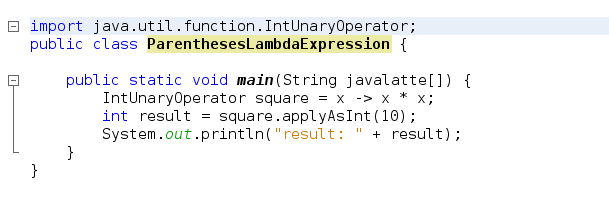
If you still difficulty in understanding this example, please first have a look on this user defined functional interface example in my previous post that help you to understand the above program and IntUnaryOperator interface.
A Lambda Expression Is an Anonymous Method
There are few rules for lambda expression to be compatible with functional interface


Lambda Expressions in Array Initializers
Lambda expressions can be used in array initializes, but generic array initializes cannot be used.
As we know about Callable functional interface and its method. We use Callable interface for initializing array or we can create our own functional interface for the same purpose.
For example, following will generate error
Callable<String>[] c=new Callable<String>[]{ ()->"a"};
A compiler error—Cannot create a generic array of Callable<String>


Casting Lambda Expressions
Sometimes the target type of a lambda expression can be ambiguous. For example, in the following assignment statement, a lambda expression is used as method argument to the Privilege.doSomething method.
The target type of the lambda expression is ambiguous because more than one functional interface— test1 and test —could be the target type of the lambda expression.
c
 What we need to do is

Class AccessController has such two method where method argument is functional interface and in such case we need to do the casting when using lambda expression in such functions.


Lambda Expressions in Conditional Expressions
Lambda expressions can be used in ternary conditional expressions, which evaluate one of the two operands based on whether a boolean condition is true or false.

Local Variables in Lambda Expressions

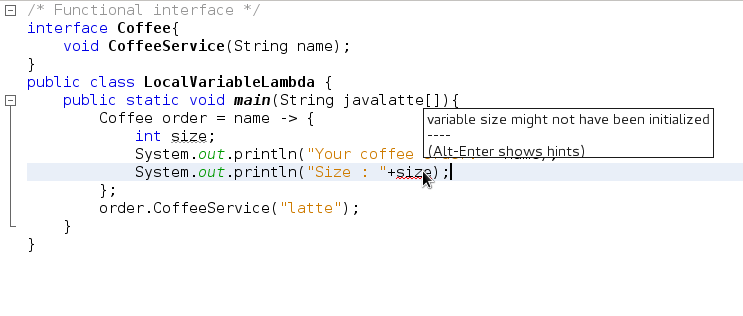 Final or Effectively Final Local Variables
Simplest Form of Lambda expression
Replace this
new SomeInterface() {
 @Override
     public SomeType someMethod(args) { body }
 }
with
(args) -> { body } That's what the main purpose of Lambda expression in Java 8
Example : In this example, we'll sort a string array on the basis of its length.
 import java.util.Arrays;
 import java.util.Comparator;
 public class LambdaSimplesFormExample {
   public static void main(String[] javalatteLambda) {
     String[] str = {"one", "two", "3", "four", "five", "sixsix", "sevennnnn", "eight"};
     Arrays.sort(str, new Comparator<String>() {
       @Override
       public int compare(String s1, String s2) {
         return (s1.length() - s2.length());
       }
     });
     Arrays.sort(str, (String s1, String s2) -> {
       return (s1.length() - s2.length());
     });
     for (String s : str) {
       System.out.println(s);
     }
   }
 }
Type Inferencing in Lambda expression
Types in argument list can be omitted since Java usually already know the expected parameters types for the single method of the functional interface.
Basic Lambda expression
Type1 var1, Type2 var2 …) -> { method body }
Lambda with type inferencing
(var1, var2 …) -> { method body }
Example : In this example, we'll sort a string array by its last character, or you can use the previous example for the same purpose.
 import java.util.Arrays;
 import java.util.Comparator;
 public class TypeInferencingLambda {
   public static void main(String[] javalatteLambda) {
     String[] str = {"one", "two", "3", "four", "five", "sixsix", "sevennnnn", "eight"};
     Arrays.sort(str, new Comparator<String>() {
       @Override
       public int compare(String s1, String s2) {
         return (s1.length() - s2.length());
       }
     });
     Arrays.sort(str, (s1, s2) -> {
       return (s1.charAt(s1.length()-1) - s2.charAt(s2.length()-1) );
     });
     for (String s : str) {
       System.out.println(s);
     }
   }
 }
Expression for Lambda body
- In Lambda we can use expression instead of block
Value of the expression will be the return value, so no explicit return statement is required. - If method has a void return type, then automatically no value will be returned.
- We use expression when method body is short because of common approach.
- Previous version
(var1, var2 …) -> { return(something); }return (s1.charAt(s1.length()-1) - s2.charAt(s2.length()-1) ); - Lambda with expression for body
(var1, var2 …) -> somethings1.charAt(s1.length()-1) - s2.charAt(s2.length()-1) ;
Example : We can use the previous examples to apply this expression for Lambda. I hope, here example is not required.
Omitting parentheses in Lambda expression
- If method takes single arg, parentgeses optional : No type should be used: you must let Java infer the type
- Previous version
(varName) -> someResult() - Lambda with parentheses omitted
varName -> someResult()
Example : In this example, we'll try to use Java 8 inbuilt functional interface i.e, IntUnaryOperator . But there are certain forms of functional interfaces that are widely, commonly useful, which did not exist previously in the JDK. A large number of these interfaces have been added to the new java.util.function package. Here are a few:
- Function<T, R> - take a T as input, return an R as ouput
- Predicate<T> - take a T as input, return a boolean as output
- Consumer<T> - take a T as input, perform some action and don't return anything
- Supplier<T> - with nothing as input, return a T
- BinaryOperator<T> - take two T's as input, return one T as output, useful for "reduce" operations
- IntConsumer - take an int as input, perform some action and don't return anything
- IntUnaryOperator - an operation on a single int-valued operand that produces an int-valued result
A Lambda Expression Is an Anonymous Method
There are few rules for lambda expression to be compatible with functional interface
- The lambda expression must return a result that is compatible with the result of the functional interface method.
- If the result is void, the lambda body is void-compatible.
- If a value is returned, the lambda body is value-compatible.
- The lambda expression signature must be the same as the functional interface method's signature.
- The lambda expression can throw only those exceptions for which an exception type or an exception supertype is declared in the functional interface method's throws clause.
Example of above rules :
Exception Handling in Lambda
- A lambda expression body must not more throw exceptions that are not specified in the functional interface.
- If lambda expression throws an exception, then throws clause of the functional interface must declare the same exception or its subtype.
Examples :
If the same exception is thrown by lambda expression which is define by the functional interface, the compiler error will resolved but when you invoked the Lambda expression again compiler error message will be shown because exception is not handled in main method.
Lambda Expressions in return Statements
A lambda expression can be used in a return statement. The return type of the method in which a lambda expression is used in a return statement must be a functional interface.
Lambda Expressions as Target Types
Lambda expressions themselves can be used as target types for inner lambda expressions.
In the following example:
- The print1() method in PrintInterface returns an Object, but the square() method in SquareInterface doesn't have a return type.
- The target type of the inner lambda expression in the LambdaTargetType class is a SquareInterface, and the target type of the outer lambda expression is PrintInterface.
- The target type is inferred from the context, which is an assignment statement to a reference variable of type PrintInterface<SquareInterface>
The inner lambda expression, () -> System.out.println("Hello Java latte : "+(x*x));, is inferred to be of type SquareInterface because the parameter list is empty and result is int; the anonymous method signature and result are the same as the square() method in the SquareInterface interface.
The outer lambda expression, () -> SquareInterface, is inferred to be of type PrintInterface<SquareInterface> because the print1() method in PrintInterface<V> does not declare any formal parameters and the result type is type parameter V.
Another Example of above case, in this example we'll use Callable<V> and Runnable interface.
Callable<V>
V call() : Computes a result, or throws an exception if unable to do so.
Runnable
void run() : When an object implementing interface Runnable is used to create a thread, starting the thread causes the object's run method to be called in that separately executing thread.

Lambda Expressions in Array Initializers
Lambda expressions can be used in array initializes, but generic array initializes cannot be used.
As we know about Callable functional interface and its method. We use Callable interface for initializing array or we can create our own functional interface for the same purpose.
For example, following will generate error
Callable<String>[] c=new Callable<String>[]{ ()->"a"};
A compiler error—Cannot create a generic array of Callable<String>
Casting Lambda Expressions
Sometimes the target type of a lambda expression can be ambiguous. For example, in the following assignment statement, a lambda expression is used as method argument to the Privilege.doSomething method.
The target type of the lambda expression is ambiguous because more than one functional interface— test1 and test —could be the target type of the lambda expression.
c
Class AccessController has such two method where method argument is functional interface and in such case we need to do the casting when using lambda expression in such functions.
Lambda Expressions in Conditional Expressions
Lambda expressions can be used in ternary conditional expressions, which evaluate one of the two operands based on whether a boolean condition is true or false.
Lambda Expression as Parameter Names
Refer to first example of this post
     Arrays.sort(str, (String s1, String s2) -> {
       return (s1.length() - s2.length());
}); - A lambda expression does not define a new scope; the lambda expression scope is the same as the enclosing scope.
- If a lambda expression body declares a local variable with the same name as a variable in the enclosing scope, a compiler error gets generated.
- A local variable, whether declared in the lambda expression body or in the enclosing scope, must be initialized before being used.
- To demonstrate this, declare a local variable in the enclosing method: int size; Use the local variable in the lambda expression.
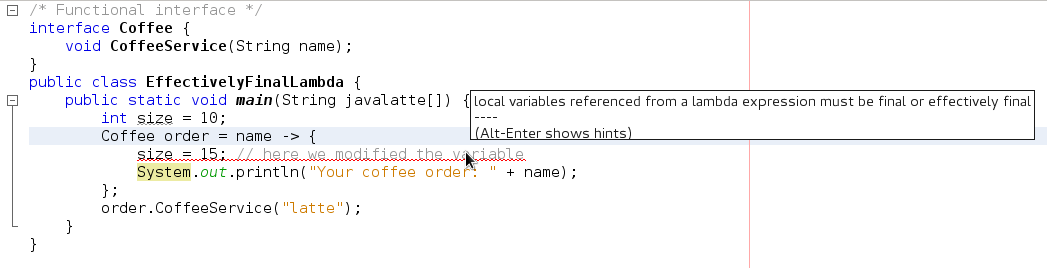
Lambdas can refer to local variables that are not declared final but are never modified. This is known as "effectively final". Where it would have been legal to declare them final.
Example of effectively final

If you know anyone who has started learning Java, why not help them out! Just share this post with them.
Thanks for studying today!...
- You can still refer to mutable instance variables.
- "this" in a lambda refers to main class, not inner class that was created for the lambda. There is no OuterClass.this.
- The this and super references in a lambda body are the same as in the enclosing context, because a lambda expression does not introduce a new scope, which is unlike the case with anonymous classes.
Let's see an example where we modified the variable in Lambda expression. Compiler will give error - local variables referenced from a lambda expression must be final or effectively final .
The variable i can be declared final as follows.
final size i=10;
Otherwise, the variable must be effectively final, which implies that the variable cannot be assigned in the lambda expression. Method parameter variables and exception parameter variables from an enclosing context must also be final or effectively final.
- With explicit declaration
final int size = somevalue;
doSomething(someArg -> use(size)); - Effectively final
int size = somevalue;
doSomething(someArg -> use(size));
If you know anyone who has started learning Java, why not help them out! Just share this post with them.
Thanks for studying today!...

