
Java Memory Management, with its built-in garbage collection, is one of the language’s finest achievements. It allows developers to create new objects without worrying explicitly about memory allocation and deallocation, because the garbage collector automatically reclaims memory for reuse. This enables faster development with less boilerplate code, while eliminating memory leaks and other memory-related problems. At least in theory. This is what we'll understand in this post.

Garbage Collection
When a Java object becomes unreachable to the program, then it is subjected to garbage collection.
The main use of garbage collection is to identify and discard objects that are no longer needed by a program so that their resources can be reclaimed and reused.
Advantages can be :
Automatic Garbage Collection
Automatic garbage collection is the process of looking at heap memory, identifying which objects are in use and which are not, and deleting the unused objects.
An in use object, or a referenced object, means that some part of your program still maintains a pointer to that object. An unused object, or unreferenced object, is no longer referenced by any part of your program. So the memory used by an unreferenced object can be reclaimed.
In a programming language like C, allocating and deallocating memory is a manual process. In Java, process of deallocating memory is handled automatically by the garbage collector
Basic process of Garbage collection can be described as follows:

Normal Deletion : In this phase, normal deletion removed the unreferenced objects leaving referenced object and pointers to free space.

Deletion with compacting : For further performance improvement, in addition to deleting unreferenced objects, you can compact the remaining referenced objects. By doing this, this makes memory allocation much easier and faster.

May be you have seen Generational Garbage collection like Young generation, old generation and permanent generation. We'll discuss these in the following section.
First question come into mind is
Why Generational Garbage collection?
You have already seen in the normal process, having to mark and compact all the objects in a JVM is inefficient. As more and more objects are allocated, the list of objects grows and grows leading to longer and longer garbage collection time as most of the objects are short lived.
JVM Generations
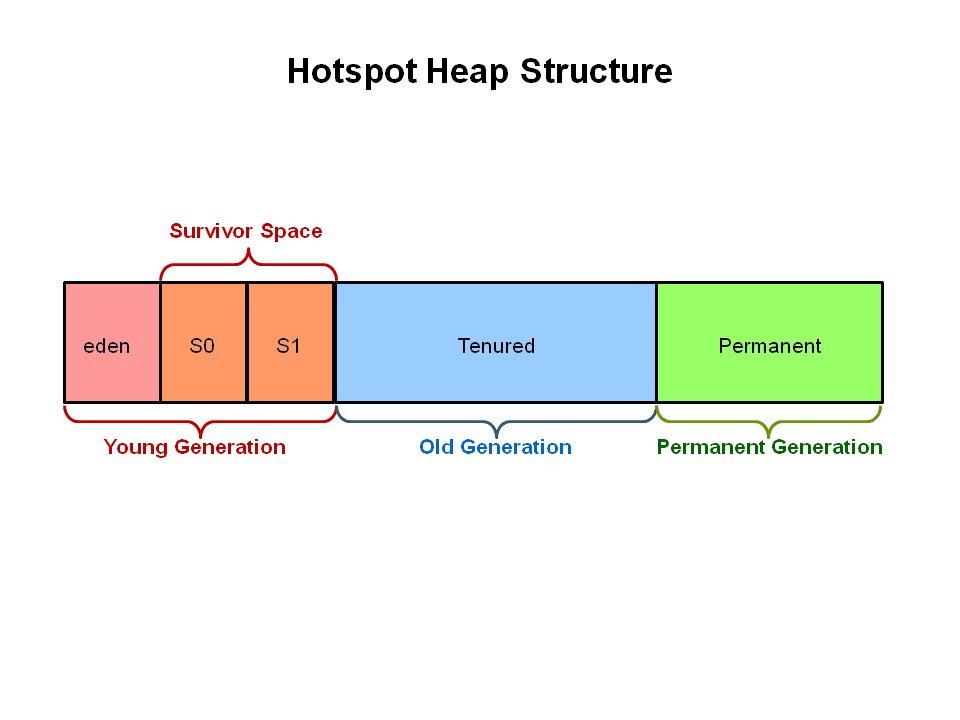 Java uses generational garbage collection. This means that if you have an object foo (which is an instance of some class), the more garbage collection events it survives (if there are still references to it), the further it gets promoted. It starts in the young generation (which itself is divided into multiple spaces - Eden and Survivor) and would eventually end up in the tenured generation if it survived long enough.
Garbage Collection
When a Java object becomes unreachable to the program, then it is subjected to garbage collection.
The main use of garbage collection is to identify and discard objects that are no longer needed by a program so that their resources can be reclaimed and reused.
Advantages can be :
- Increase productivity as no need to worry about memory issues.
- Program integrity.
- Garbage collection is an important part of Java's security strategy. Java programmers are unable to accidentally crash the Java virtual machine by incorrectly freeing memory.
Automatic Garbage Collection
Automatic garbage collection is the process of looking at heap memory, identifying which objects are in use and which are not, and deleting the unused objects.
An in use object, or a referenced object, means that some part of your program still maintains a pointer to that object. An unused object, or unreferenced object, is no longer referenced by any part of your program. So the memory used by an unreferenced object can be reclaimed.
In a programming language like C, allocating and deallocating memory is a manual process. In Java, process of deallocating memory is handled automatically by the garbage collector
Basic process of Garbage collection can be described as follows:
- Marking
- Normal Deletion
- Deletion with compacting
Marking : Marking means identifies which pieces of memory are in use and which are not.
All the objects are scanned in this phase to make this determination. This can be very time consuming process if all objects in a system must be scanned.
Deletion with compacting : For further performance improvement, in addition to deleting unreferenced objects, you can compact the remaining referenced objects. By doing this, this makes memory allocation much easier and faster.
May be you have seen Generational Garbage collection like Young generation, old generation and permanent generation. We'll discuss these in the following section.
First question come into mind is
Why Generational Garbage collection?
You have already seen in the normal process, having to mark and compact all the objects in a JVM is inefficient. As more and more objects are allocated, the list of objects grows and grows leading to longer and longer garbage collection time as most of the objects are short lived.
JVM Generations
- Young generation
- Old or Tenured Generation
- Permanent Generation : Now this is replaced by Metaspace in Java 8
Heap is divided into smaller parts or generations : Young Generation, Old Generation and Permanent Generation.
- Young Generation is where all new objects are allocated and aged.
- Eden Space (heap): The pool from which memory is initially allocated for most objects.
- Survivor Space (heap): The pool containing objects that have survived the garbage collection of the Eden space.
- Tenured Generation (heap): The pool containing objects that have existed for some time in the survivor space.
- Permanent Generation (non-heap): The pool containing all the reflective data of the virtual machine itself, such as class and method objects. With Java VMs that use class data sharing, this generation is divided into read-only and read-write areas.
When the young generation fills up, this causes a minor garbage collection. Minor collections can be optimized assuming a high object mortality rate. A young generation full of dead objects is collected very quickly. Some surviving objects are aged and eventually move to the old generation.
Stop the World Event - All minor garbage collections are "Stop the World" events. This means that all application hreads are stopped until the operation completes. Minor garbage collections are always Stop the World events.The Old Generation is used to store long surviving objects. Typically, a threshold is set for young generation object and when that age is met, the object gets moved to the old generation. Eventually the old generation needs to be collected. This event is called a major garbage collection.
Major garbage collection are also Stop the World events. Often a major collection is much slower because it involves all live objects. So for Responsive applications, major garbage collections should be minimized. Also note, that the length of the Stop the World event for a major garbage collection is affected by the kind of garbage collector that is used for the old generation space.
The Permanent generation contains metadata required by the JVM to describe the classes and methods used in the application. The permanent generation is populated by the JVM at runtime based on classes in use by the application. In addition, Java SE library classes and methods may be stored here.
Classes may get collected (unloaded) if the JVM finds they are no longer needed and space may be needed for other classes. The permanent generation is included in a full garbage collection.
Generation Garbage Collection process
Now, I consider you got the idea why the heap is divided into different generations. We'll see how these space interact with each other with the help of pictures showing object allocation and aging process in JVM
1. First, any new objects are allocated to the eden space. Both survivor spaces start out empty.

2. When the eden space fills up, a minor garbage collection is triggered.

3. Referenced objects are moved to the first survivor space. Unreferenced objects are deleted when the eden space is cleared.

4. At the next minor GC, the same thing happens for the eden space. Unreferenced objects are deleted and referenced objects are moved to a survivor space. However, in this case, they are moved to the second survivor space (S1). In addition, objects from the last minor GC on the first survivor space (S0) have their age incremented and get moved to S1. Once all surviving objects have been moved to S1, both S0 and eden are cleared. Notice we now have differently aged object in the survivor space.
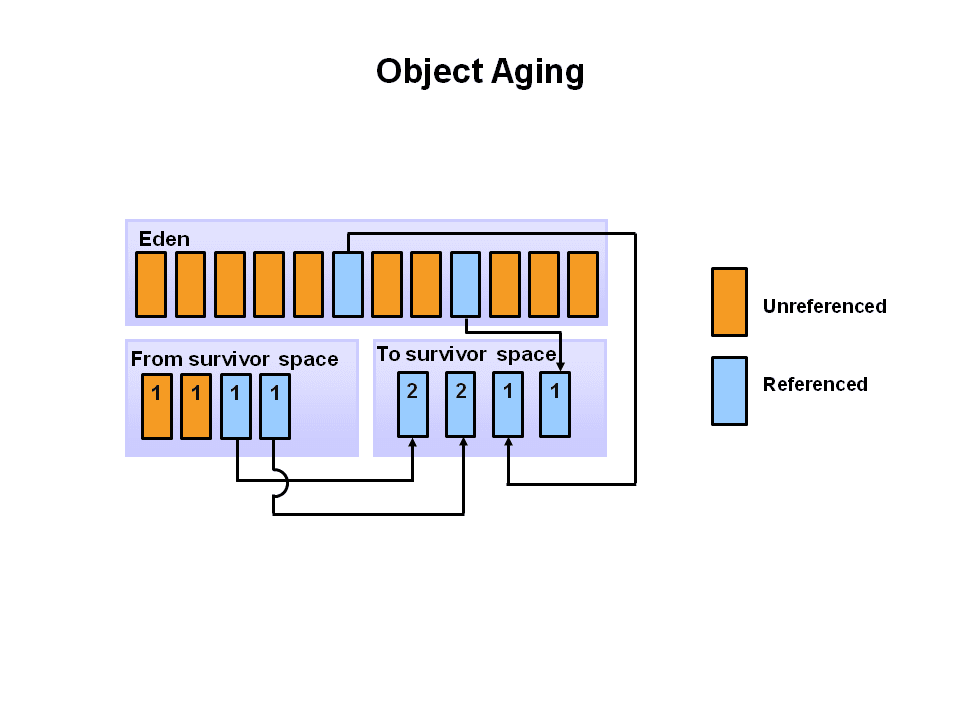
5. At the next minor GC, the same process repeats. However this time the survivor spaces switch. Referenced objects are moved to S0. Surviving objects are aged. Eden and S1 are cleared.

6. After a minor GC, when aged objects reach a certain age threshold (8 in this example) they are promoted from young generation to old generation.

7. As minor GCs continue to occure objects will continue to be promoted to the old generation space

8. So that pretty much covers the entire process with the young generation. Eventually, a major GC will be performed on the old generation which cleans up and compacts that space.

How Garbage Collection Really Works
Many people think garbage collection collects and discards dead objects. In reality, Java garbage collection is doing the opposite! Live objects are tracked and everything else designated garbage. As you’ll see, this fundamental misunderstanding can lead to many performance problems.
Let's start with the heap, which is the area of memory used for dynamic allocation. In most configurations the operating system allocates the heap in advance to be managed by the JVM while the program is running. This has a couple of important ramifications:
There are four kinds of GC roots in Java:
Therefore, a simple Java application has the following GC roots:
Garbage Deallocation Mechanism
User Controlled Deallocation
Deallocation can be manual or automatic. Manual allocation involve explicit programmer initiated call to routine like free(), delete() in C/C++. Then object is then added to a free space list for subsequent reallocation.
Automatic Garbage Collection
The alternative to manual deallocation of heap space is garbage collection. Many garbage collection techniques exist.
Here are some of the most important approaches:
Reference Counting
This is one of the oldest and simplest garbage collection techniques.
A reference count field is added to each heap object. It counts how many references to the heap object exist. When an object’s reference count reaches zero, it is garbage and may collected.
Mark-Sweep Collection
Many collectors, including mark & sweep, do nothing until heap space is nearly exhausted.
Then it executes a marking phase that identifies all live heap objects.
After the marking phase, any object not marked is garbage that may be freed. We then sweep through the heap, collecting all unmarked objects. During the sweep phase we also clear all marks from heap objects found to be still in use.
It's basically two-step process
Compaction
We can add a compaction phase to mark-sweep garbage collection. After live objects are identified, they are placed together at one end of the heap. This involves another tracing phase in which global, local and internal heap pointers are found and adjusted
to reflect the object’s new location.
Copying Collectors
An entire family of garbage collection techniques, called copying collectors are designed to integrate copying with recognition of live heap objects. Copying collectors are very popular and are widely used.
Consider a simple copying collector that uses semispaces. We start with the heap divided into
two halve - the from and to spaces.
Initially, we allocate heap requests from the from space, using a simple “end of heap” pointer. When the from space is exhausted, we stop and do garbage collection. Actually, though we don’t collect garbage. We collect live heap objects—garbage is never touched.
We trace through global and local pointers, finding live objects. As each object is found, it is moved from its current position in the from space to the next available position in the to space. The pointer is updated to reflect the object’s new location
Generational Techniques
The great strength of copying collectors is that they do no work for objects that are born and die between collections. However, not all heaps objects are so shortlived. In fact, some heap objects are very long-lived.
Generational garbage collection techniques were developed to better handle objects with varying lifetimes. The heap is divided into two or more generations, each with its own to and from space. New objects are allocated in the youngest generation, which is collected most frequently. If an object survives across one or more collections of the youngest generation, it is “promoted” to the next older generation, which is collected less often. Objects that survive one or more collections of this generation are then moved to the next older generation. This
continues until very long-lived objects reach the oldest generation, which is collected very infrequently
The advantage of this approach is that long-lived objects are “filtered out,” greatly reducing the cost of repeatedly processing them. Of course, some long-lived objects will die and these will be caught when their generation is eventually collected.
Different ways to make an object eligible for Garbage Collection?
How to set the Perm area size?
You can set the Perm area size with the -XX:PermSize and -XX:MaxPermSize options but only when OutOfMemoryError occurs and the cause is the Perm area size.
Terms used in Tuning Garbage Collection
Sizing the Generations
-XX:SurvivorRatio
Example
Xmx / Xms = 1000 MB
NewRatio = 3
From this we can calculate
Old area (Old Generation) = 750 & New Area (the sum of Survivor Space (both S0 and S1) and Eden Space) = 250
If SurvivorRatio = 10 then each Survivor Space = 1/12 of Eden i.e, 20.888 = 21
S0 & S1 = 21
Eden space= 208
 Amount of available after garbage collection will be different on your computer
HotSpot Heap structure has been changed in Java 8, check this link
If you know anyone who has started learning java, why not help them out! Just share this post with them.

Thanks for studying today!...
Stop the World Event - All minor garbage collections are "Stop the World" events. This means that all application hreads are stopped until the operation completes. Minor garbage collections are always Stop the World events.The Old Generation is used to store long surviving objects. Typically, a threshold is set for young generation object and when that age is met, the object gets moved to the old generation. Eventually the old generation needs to be collected. This event is called a major garbage collection.
Major garbage collection are also Stop the World events. Often a major collection is much slower because it involves all live objects. So for Responsive applications, major garbage collections should be minimized. Also note, that the length of the Stop the World event for a major garbage collection is affected by the kind of garbage collector that is used for the old generation space.
The Permanent generation contains metadata required by the JVM to describe the classes and methods used in the application. The permanent generation is populated by the JVM at runtime based on classes in use by the application. In addition, Java SE library classes and methods may be stored here.
Classes may get collected (unloaded) if the JVM finds they are no longer needed and space may be needed for other classes. The permanent generation is included in a full garbage collection.
Generation Garbage Collection process
Now, I consider you got the idea why the heap is divided into different generations. We'll see how these space interact with each other with the help of pictures showing object allocation and aging process in JVM
1. First, any new objects are allocated to the eden space. Both survivor spaces start out empty.
2. When the eden space fills up, a minor garbage collection is triggered.
3. Referenced objects are moved to the first survivor space. Unreferenced objects are deleted when the eden space is cleared.
4. At the next minor GC, the same thing happens for the eden space. Unreferenced objects are deleted and referenced objects are moved to a survivor space. However, in this case, they are moved to the second survivor space (S1). In addition, objects from the last minor GC on the first survivor space (S0) have their age incremented and get moved to S1. Once all surviving objects have been moved to S1, both S0 and eden are cleared. Notice we now have differently aged object in the survivor space.
5. At the next minor GC, the same process repeats. However this time the survivor spaces switch. Referenced objects are moved to S0. Surviving objects are aged. Eden and S1 are cleared.
6. After a minor GC, when aged objects reach a certain age threshold (8 in this example) they are promoted from young generation to old generation.
7. As minor GCs continue to occure objects will continue to be promoted to the old generation space
8. So that pretty much covers the entire process with the young generation. Eventually, a major GC will be performed on the old generation which cleans up and compacts that space.
How Garbage Collection Really Works
Many people think garbage collection collects and discards dead objects. In reality, Java garbage collection is doing the opposite! Live objects are tracked and everything else designated garbage. As you’ll see, this fundamental misunderstanding can lead to many performance problems.
Let's start with the heap, which is the area of memory used for dynamic allocation. In most configurations the operating system allocates the heap in advance to be managed by the JVM while the program is running. This has a couple of important ramifications:
- Object creation is faster because global synchronization with the operating system is not needed for every single object. An allocation simply claims some portion of a memory array and moves the offset pointer forward . The next allocation starts at this offset and claims the next portion of the array.
- When an object is no longer used, the garbage collector reclaims the underlying memory and reuses it for future object allocation. This means there is no explicit deletion and no memory is given back to the operating system.
All objects are allocated on the heap area managed by the JVM. Every item that the developer uses is treated this way, including class objects, static variables, and even the code itself. As long as an object is being referenced, the JVM considers it alive. Once an object is no longer referenced and therefore is not reachable by the application code, the garbage collector removes it and reclaims the unused memory. As simple as this sounds, it raises a question: what is the first reference in the tree?
Garbage-Collection Roots
Every object tree must have one or more root objects. As long as the application can reach those roots, the whole tree is reachable. But when are those root objects considered reachable? Special objects called garbage-collection roots are always reachable and so is any object that has a garbage-collection root at its own root.There are four kinds of GC roots in Java:
- Local variables are kept alive by the stack of a thread. This is not a real object virtual reference and thus is not visible. For all intents and purposes, local variables are GC roots.
- Active Java threads are always considered live objects and are therefore GC roots. This is especially important for thread local variables.
- Static variables are referenced by their classes. This fact makes them de facto GC roots. Classes themselves can be garbage-collected, which would remove all referenced static variables.
- JNI References are Java objects that the native code has created as part of a JNI call. Objects thus created are treated specially because the JVM does not know if it is being referenced by the native code or not. Such objects represent a very special form of GC root.
Therefore, a simple Java application has the following GC roots:
- Local variables in the main method
- The main thread
- Static variables of the main class
Garbage Deallocation Mechanism
User Controlled Deallocation
Deallocation can be manual or automatic. Manual allocation involve explicit programmer initiated call to routine like free(), delete() in C/C++. Then object is then added to a free space list for subsequent reallocation.
Automatic Garbage Collection
The alternative to manual deallocation of heap space is garbage collection. Many garbage collection techniques exist.
Here are some of the most important approaches:
Reference Counting
This is one of the oldest and simplest garbage collection techniques.
A reference count field is added to each heap object. It counts how many references to the heap object exist. When an object’s reference count reaches zero, it is garbage and may collected.
Mark-Sweep Collection
Many collectors, including mark & sweep, do nothing until heap space is nearly exhausted.
Then it executes a marking phase that identifies all live heap objects.
After the marking phase, any object not marked is garbage that may be freed. We then sweep through the heap, collecting all unmarked objects. During the sweep phase we also clear all marks from heap objects found to be still in use.
It's basically two-step process
- The algorithm traverses all object references, starting with the GC roots, and marks every object found as alive.
- All of the heap memory that is not occupied by marked objects is reclaimed. It is simply marked as free, essentially swept free of unused objects.
Compaction
After the sweep phase, live heap objects are distributed throughout the heap space. This can lead to poor locality. If live objects span many memory pages, paging overhead may be increased. Cache locality may be degraded too.
to reflect the object’s new location.
Copying Collectors
An entire family of garbage collection techniques, called copying collectors are designed to integrate copying with recognition of live heap objects. Copying collectors are very popular and are widely used.
Consider a simple copying collector that uses semispaces. We start with the heap divided into
two halve - the from and to spaces.
Initially, we allocate heap requests from the from space, using a simple “end of heap” pointer. When the from space is exhausted, we stop and do garbage collection. Actually, though we don’t collect garbage. We collect live heap objects—garbage is never touched.
We trace through global and local pointers, finding live objects. As each object is found, it is moved from its current position in the from space to the next available position in the to space. The pointer is updated to reflect the object’s new location
Generational Techniques
The great strength of copying collectors is that they do no work for objects that are born and die between collections. However, not all heaps objects are so shortlived. In fact, some heap objects are very long-lived.
Generational garbage collection techniques were developed to better handle objects with varying lifetimes. The heap is divided into two or more generations, each with its own to and from space. New objects are allocated in the youngest generation, which is collected most frequently. If an object survives across one or more collections of the youngest generation, it is “promoted” to the next older generation, which is collected less often. Objects that survive one or more collections of this generation are then moved to the next older generation. This
continues until very long-lived objects reach the oldest generation, which is collected very infrequently
The advantage of this approach is that long-lived objects are “filtered out,” greatly reducing the cost of repeatedly processing them. Of course, some long-lived objects will die and these will be caught when their generation is eventually collected.
- Which part of the memory is involved in Garbage Collection?
Heap - What is responsibility of Garbage Collector?
Garbage collector frees the memory occupied by the unreachable objects during the java program by deleting these unreachable objects. It ensures that the available memory will be used efficiently, but does not guarantee that there will be sufficient memory for the program to run. - When does an object become eligible for garbage collection?
An object becomes eligible for Garbage Collection when no live thread can access it. - Can the Garbage Collection be forced to run?
No. The Garbage Collection can not be forced, though there are few ways by which it can be requested there is no guarantee that these requests will be taken care of by JVM. - How can the Garbage Collection be requested?
- The methods to perform the garbage collections are present in the Runtime class provided by java. The Runtime class is a Singleton for each java main program.The method getRuntime() returns a singleton instance of the Runtime class. The method gc() can be invoked using this instance of Runtime to request the garbage collection.
- Call the System class System.gc() method which will request the jvm to perform GC.
- Does garbage collection guarantee that a program will not run out of memory?
It does not guarantee that a program will not run out of memory. - What is the purpose of finalization in java?
It gives the opportunity to unreachable object to perform any clean, before the object gets garbage collected. For instance, closing a closing, releasing any resources etc. - If an object is garbage collected, can it become reachable again?
No - How String are garbage collected?
Under normal circumstances, string literals and classes are all allocated into the JVM's permanent generation and usually won't ever be collected.
String s = new String("java-latte");
the string object referred by s will be on heap and the string literal "java-latte" will be in string pool.The objects in the string pool will not be garbage collected. They are there to be reused during the lifetime of the program, to improve the performance.
If you intern() like this
String s = new String("java-latte").Intern();
The object return by intern() method represent the "java-latte" string literal. But, interned string which are not identical with String literals can be garbage collected once they are unreachable. - Are static fields garbage collected?
Static fields can't be garbage collected while the class is loaded. They can be garbage collected when the respective class loader which is responsible for loading the class is itself garbage collected.
Basically, static variable are referenced by class objects which are referenced by classloader, so unless the class loader drop the class somehow or class loader itself become eligible for garbage collection the static variable won't be garbage collected. - How many times does the garbage collector calls the finalize() method for an object?
One - What happens if an uncaught exception is thrown from during the execution of the finalize() method of an object?
The exception will be ignored and the garbage collection (finalization) of that object terminates. - Enable/disable call of finalize() method of exit of the application?
Runtime.getRuntime().runFinalizersOnExit(boolean value) . Passing the boolean value will either disable or enable the finalize() call. - Is garbage collector a dameon thread?
Yes . A dameon thread runs behind the application. It is started by JVM. The thread stops when all non-dameon threads stop. - Garbage Collector is controlled by whom?
The JVM controls the Garbage Collector; it decides when to run the Garbage Collector. JVM runs the Garbage Collector when it realizes that the memory is running low, but this behavior of jvm can not be guaranteed. One can request the Garbage Collection to happen from within the java program but there is no guarantee that this request will be taken care of by jvm. - How the garbage collection occurred with instance member and static member in a class?
Members are not garbage collected objects are
An object becomes eligible for Garbage Collection when no live thread can access it.Static variables are referenced by Class objects which are referenced by classLoaders so unless either the ClassLoader drops the Class somehow or the ClassLoader itself becomes eligible for collection (think of unloading your application) - How to make a "singleton" eligible for garbage collection?
You must have a method to set the static variable to null(and hope that nothing else had taken a copy of the reference). Obviously the next time anyone asked for an instance,it would need to be recreated... at which point it's not really a singleton, of course. - Storage Area of static member in JVM memory?
static member variables are kept on the Permanent Genration.
- Set all available object references to null once its purpose is over
- Make the reference variable to refer to another object :
String str1 = "Java.latte.blogspot.in";
String str2 = "google.com";
//String object referred by str1 is not eligible for GC yet
str1 = str2;
//str1 variable referes to the String object "google.com" and the object "Java.latte.blogspot.in" is not referred by any variable and hence is eligible for GC - Creating Islands of Isolation
If you have two instance reference variables which are referring to the instances of the same class, and these two reference variables refer to each other and the objects referred by these reference variables do not have any other valid reference then these two objects are said to form an Island of Isolation and are eligible for Garbage Collection.
Test gc3;
Test gc1 = new Test ();
Test gc2 = new Test ();
gc1.g = gc2;
gc2.g = gc1;
gc1 = null;
gc2 = null;
Here gc1 and gc2 refer to each other and have no other valid, form Island of Isolation and eligible for Garbage collection
How to set the Perm area size?
You can set the Perm area size with the -XX:PermSize and -XX:MaxPermSize options but only when OutOfMemoryError occurs and the cause is the Perm area size.
Terms used in Tuning Garbage Collection
- Heap area size -Xms Heap area size when starting JVM
-Xmx Maximum heap area size - New area size
-XX:NewRatio Ratio of New area and Old area
-XX:NewSize New area size
-XX:SurvivorRatio Ratio of Eden area and Survivor area
Sizing the Generations
- The -Xmx value determines the size of the heap to reserve at JVM initialization
- The -Xms value is the space in memory that is committed to the VM at init. The JVM can grow to the size of -Xmx
- The difference between -Xmx and -Xms is virtual memory (virtually committed)
Total Heap
- Total available memory is the most important factor affecting GC performance
- By default the JVM grows or shrinks the heap at each GC to keep the ratio of free space to live objects at each collection within a specified range.
-XX:MinHeapFreeRatio - when the percentage of free space in a generation falls below this value the generation will be expanded to meet this percentage. Default is 40
-XX:MaxHeapFreeRatio - when the percentage of free space in a generation exceeded this value the generation will shrink to meet this value. Default is 70
The Young Generation
The bigger the young generation the less minor GC's, but this implies a smaller tenured generation which increases the frequency of major collections.
If you are not able to understand this, please go through the step mention above with pictures
Young Generation Guarantee
- The -XX:SurvivorRatio option can be used to tune the number of survivor spaces
- Not often important for performance
-XX:SurvivorRatio
It is "the ratio between each survivor space and eden space" . The SurvivorRatio parameter controls the size of the two survivor spaces.
As you seen above the young Generation is divided into 3 parts.
For example, -XX:SurvivorRatio=6 sets the ratio between each survivor space and eden to be 1:6, each survivor space will be one eighth of the young generation.
For example, -XX:SurvivorRatio=6 sets the ratio between each survivor space and eden to be 1:6, each survivor space will be one eighth of the young generation.
To clear this, consider x= s0 (survior one), x= s2 (survior two) and 6x = eden space means total= 8x for young Generation. It's clear that each survivor space will be one eighth of the young generation.
-XX:NewSize
It is sum of Survivor Space (both S0 and S1) and Eden Space
-XX:NewRatio
NewRatio is the ratio of the New area(sum of Survivor Space (both S0 and S1) and Eden Space.) and the Old area (Old Generation).
If XX:NewRatio=1, New area:Old area is 1:1. For 1 GB, New area:Old area is 500MB: 500MB.
If NewRatio is 2, New area:Old area is 1:2. Therefore, as the value gets larger, the Old area size gets larger and the New area size gets smaller.
Old Generation = 2/3 of the heap.
-XX:+PrintTenuringDistribution
shows the threshold chosen by JVM to keep survivors half full, and the ages of objects in the new generation.
shows the threshold chosen by JVM to keep survivors half full, and the ages of objects in the new generation.
Example
Xmx / Xms = 1000 MB
NewRatio = 3
From this we can calculate
Old area (Old Generation) = 750 & New Area (the sum of Survivor Space (both S0 and S1) and Eden Space) = 250
If SurvivorRatio = 10 then each Survivor Space = 1/12 of Eden i.e, 20.888 = 21
S0 & S1 = 21
Eden space= 208
HotSpot Heap structure has been changed in Java 8, check this link
If you know anyone who has started learning java, why not help them out! Just share this post with them. Thanks for studying today!...


