Java SE 8 will instead ship with a new engine called Oracle Nashorn which can be used as a command line tool and as an embedded interpreter in Java applications.
In this post, we'll see how to use Oracle Nashorn in several ways. It includes using the standalone engine through command line tool jjs as well as using Oracle Nashorn as an embedded scripting engine inside Java applications. This article show shows the Java-to-JavaScript interoperability and how Java types can be implemented and extended from JavaScript.

Nashorn is a JavaScript engine developed in the Java programming language by Oracle. It is based on the (JSR 292) and has been released with Java 8.
Oracle’s JDK 8 or OpenJDK 8 include a command-line tool called jjs. It can be found in the bin/ folder of a JDK installation along with the well-known java, javac, or jar tools.
Features of Oracle Nashorn
Let's start using Oracle Nashorn
Oracle Nashorn as a JavaScript
A simple way to start with Oracle Nashorn is to run JavaScript program from command line. The jjs tool accepts a list of JavaScript source code files as arguments
Example 1 test.js First basic example


Example 2 In this example we'll use filter() method of JavaScript. The filter() method creates a new array with all elements that pass the test implemented by the provided function.
Syntax
arr.filter(callback[, thisArg])
callback : Function to test each element of the array.
thisArg : Value to use as this when executing callback.
filter calls a provided callback function once for each element in an array, and constructs a new array of all the values for which callback returns a true value. callback is invoked only for indexes of the array which have assigned values; it is not invoked for indexes which have been deleted or which have never been assigned values. Array elements which do not pass the callback test are simply skipped, and are not included in the new array.
Callback is invoked with three arguments:

 Example 3 array1.js Find even number

 Example 4 string.js How to use String object


Scripting Extensions
If you run jjs -help to get a comprehensive list of the jjs command-line tool commands, you will notice a few interesting features: One of them is
-scripting (Enable scripting features.) . An intriguing scripting mode can be enabled.
The scripting mode is interesting if you plan to take advantage of jjs to run system scripts written in JavaScript, just as you would do in Python, Ruby, or Bash.
The scripting mode mainly consists of two language extensions:
Heredocs
Heredocs are simply multiline strings, and they use a syntax that is familiar to Bash, Perl, and Ruby programmers
Text begins with << followed by a special termination marker, which is EOF in our case. Also, JavaScript expressions can be embedded in ${...} expressions.
Shell invocations.
Note that in scripting mode, double-quoted strings can embed expressions that will be evaluated: "Hello ${name}" will evaluate against the value of name, while 'Hello ${name}' will not.
Shell invocations allow the invocation of external programs in which the command is put between back-tick characters.
The scripting mode provides further goodies:
Example envirnoment.js, This example show how to use $ARG.


Example envVariable.js, This example show how to use environment variable.


print() and echo()
These functions are synonymous, causing the values passed in as arguments to be converted to strings, printed to stdout separated by spaces, and followed by a new line. The implementation involves calls to java.lang.System.out.print(string) followed by java.lang.System.out.println().
readLine()
This function reads one line of input from stdin and sends it to stdout, or you can assign the result to a variable. You can also pass a string to the readLine() function to get a prompt line.
readFully()
This function reads the entire contents of a file passed in as a string argument and sends it to stdout, or you can assign the result to a variable.
ReadLine.js
 Execution

Scripting Languages and Java
Scripting languages are programming languages that support the ability to write scripts. Unlike source files for other programming languages that must be compiled into bytecode before you run them, scripts are evaluated by a runtime environment (in this case, by a script engine) directly.
Most scripting languages are dynamically typed. This enables you to create new variables without declaring the variable type (the interpreter assigns the type based on the type of the object associated with the variable), and you can reuse the same variable for objects of different types (type conversion is performed automatically).
By embedding scripts in your Java code, you can customize and extend the Java application. For example, you can have configuration parameters, business logic, math expressions, and other external parts written as scripts. When developing your Java application, you do not need to choose the scripting language. If you write your application with the Java Scripting API (defined by JSR 223), then users can write scripts in any language compliant with JSR 223
Embedding Oracle Nashorn
The Java Scripting API consists of classes and interfaces from the javax.script package. It is a relatively small and simple package with the ScriptEngineManager class as the starting point. A ScriptEngineManager object can discover script engines through the JAR file service discovery mechanism, and instantiate ScriptEngine objects that interpret scripts written in a specific scripting language. The Nashorn engine is the default ECMAScript (JavaScript) engine bundled with the Java SE Development Kit (JDK). For more information about the javax.script package
To use the Java Scripting API:

Example Invoke Script function as statement
Example Invoke Script function
function.js

 Example : Invoking a Script Object's Method
object.js


Example Implementing a Java Interface with Script Functions
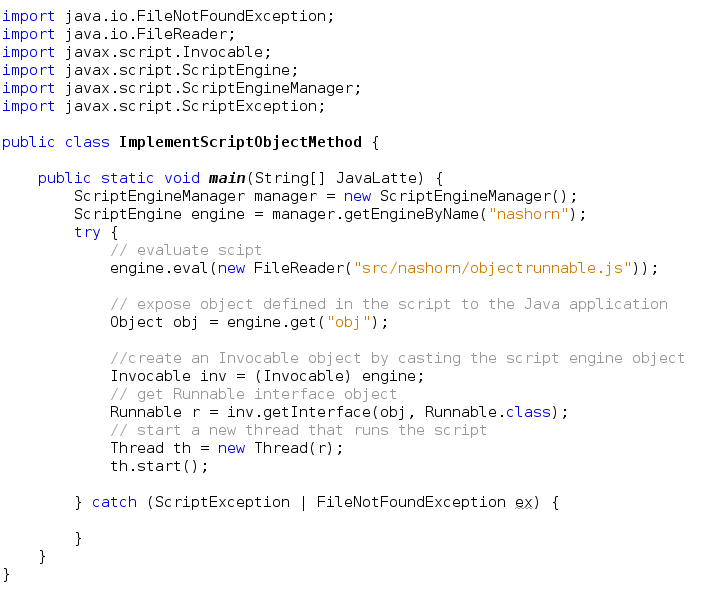
In this example, the eval() method is called with JavaScript code that defines a function. Then, an Invocable object is created, and its getInterface() method is used to create a Runnable interface object. The methods of the interface are implemented by script functions with matching names (in this case, the run() function is used to implement the run() method in the interface object). Finally, a new thread is started that runs the script function.
runnable.js

 Example Implementing a Java Interface with the Script Object's Methods
objectrunnable.js

Using Java From Scripts
Accessing Java Classes
To access primitive and reference Java types from JavaScript, call the Java.type() function, which returns a type object that corresponds to the full name of the class passed in as a string
For instance,
In this post, we'll see how to use Oracle Nashorn in several ways. It includes using the standalone engine through command line tool jjs as well as using Oracle Nashorn as an embedded scripting engine inside Java applications. This article show shows the Java-to-JavaScript interoperability and how Java types can be implemented and extended from JavaScript.
Nashorn is a JavaScript engine developed in the Java programming language by Oracle. It is based on the (JSR 292) and has been released with Java 8.
Oracle’s JDK 8 or OpenJDK 8 include a command-line tool called jjs. It can be found in the bin/ folder of a JDK installation along with the well-known java, javac, or jar tools.
Features of Oracle Nashorn
- Interoperable
- Rather then being just another JavaScript engine, Nashorn provides interoperability between the Java and JavaScript worlds. That means your Java code can call JavaScript code, and vice versa.
- Nashorn provides global objects to access and instantiate Java classes from JavaScript. Their members can be accessed using the familiar ‘.’ notation as in Java.
- Getters and setters in JavaBeans are exposed as equivalent JavaScript properties.
- Bounds-checked Java arrays can be instantiated and accessed from JavaScript, while JavaScript arrays can be converted to regular Java arrays when needed.
- You can use for and for each to traverse through both types of arrays.
- Strings and numbers are handled transparently, by interpreting them as instances of the corresponding Java classes, depending on the operation performed.
- Finally, collections are interpreted as arrays.
- Performant
- Under the hood, Nashorn uses the invokedynamic JVM instruction to implement all of its invocations.
- Since JavaScript does not have a 'native' bytecode format, JavaScript source code is first parsed to construct an immediate representation (AST/IR). The AST/IR is then lowered to something closer to JVM bytecode by transformation of controls, reduction of expressions to primitive operations, and simplification of calls, to be efficiently translated to JVM instructions, and securely loaded into the JVM. Generated code and call history are cached by the linker, to make lookup and invocation faster on successive relinks - JavaScript being a dynamic language, the actual code that needs to be ran by the JVM for a function being invoked at a given point in the code may change over time, and need to be recompiled and relinked. Nashorn takes care of all that under the hood using high quality third party helper libraries.
- Shell Scripting
- Nashorn comes with a number of small extensions to make it easier to use JavaScript for shell scripting. They are enabled by passing the -scripting flag to the jjs application. But if your script starts with the shebang (#!) characters and the direct path to the jjs application, you don’t need to pass the flag.
- You can use string interpolation (${var}) to use the values of variables or expressions to construct strings within double quotation marks.
- Additionally, Nashorn provides several built-in functions to exit the script, print and read lines from standard output and input, read files, load scripts, and bind properties of objects.
- JavaFX
You can write JavaFX applications entirely in JavaScript using Nashorn. In order to let the jjs application know that your script is a JavaFX application, you need to pass the -fx flag to it.That way, Nashorn automatically takes care of calling the right JavaFX methods to setup the application, and eliminates the need to provide boiler plate code.
Let's start using Oracle Nashorn
Oracle Nashorn as a JavaScript
A simple way to start with Oracle Nashorn is to run JavaScript program from command line. The jjs tool accepts a list of JavaScript source code files as arguments
Example 2 In this example we'll use filter() method of JavaScript. The filter() method creates a new array with all elements that pass the test implemented by the provided function.
Syntax
arr.filter(callback[, thisArg])
callback : Function to test each element of the array.
thisArg : Value to use as this when executing callback.
filter calls a provided callback function once for each element in an array, and constructs a new array of all the values for which callback returns a true value. callback is invoked only for indexes of the array which have assigned values; it is not invoked for indexes which have been deleted or which have never been assigned values. Array elements which do not pass the callback test are simply skipped, and are not included in the new array.
Callback is invoked with three arguments:
- the value of the element
- the index of the element
- the Array object being traversed
Scripting Extensions
If you run jjs -help to get a comprehensive list of the jjs command-line tool commands, you will notice a few interesting features: One of them is
-scripting (Enable scripting features.) . An intriguing scripting mode can be enabled.
The scripting mode is interesting if you plan to take advantage of jjs to run system scripts written in JavaScript, just as you would do in Python, Ruby, or Bash.
The scripting mode mainly consists of two language extensions:
- heredocs
- shell invocations.
Heredocs
Heredocs are simply multiline strings, and they use a syntax that is familiar to Bash, Perl, and Ruby programmers
Text begins with << followed by a special termination marker, which is EOF in our case. Also, JavaScript expressions can be embedded in ${...} expressions.
Shell invocations.
Note that in scripting mode, double-quoted strings can embed expressions that will be evaluated: "Hello ${name}" will evaluate against the value of name, while 'Hello ${name}' will not.
Shell invocations allow the invocation of external programs in which the command is put between back-tick characters.
The scripting mode provides further goodies:
- The $ENV variable provides the shell environment variables.
- The $ARG variable is an array of the program command-line arguments.
- Comments can start with #, which is useful for making scripts executable on UNIX-like systems. exit(code) and quit() functions can terminate the current JVM process.
Example envirnoment.js, This example show how to use $ARG.
Example envVariable.js, This example show how to use environment variable.
print() and echo()
These functions are synonymous, causing the values passed in as arguments to be converted to strings, printed to stdout separated by spaces, and followed by a new line. The implementation involves calls to java.lang.System.out.print(string) followed by java.lang.System.out.println().
readLine()
This function reads one line of input from stdin and sends it to stdout, or you can assign the result to a variable. You can also pass a string to the readLine() function to get a prompt line.
readFully()
This function reads the entire contents of a file passed in as a string argument and sends it to stdout, or you can assign the result to a variable.
ReadLine.js
Scripting Languages and Java
Scripting languages are programming languages that support the ability to write scripts. Unlike source files for other programming languages that must be compiled into bytecode before you run them, scripts are evaluated by a runtime environment (in this case, by a script engine) directly.
Most scripting languages are dynamically typed. This enables you to create new variables without declaring the variable type (the interpreter assigns the type based on the type of the object associated with the variable), and you can reuse the same variable for objects of different types (type conversion is performed automatically).
By embedding scripts in your Java code, you can customize and extend the Java application. For example, you can have configuration parameters, business logic, math expressions, and other external parts written as scripts. When developing your Java application, you do not need to choose the scripting language. If you write your application with the Java Scripting API (defined by JSR 223), then users can write scripts in any language compliant with JSR 223
Embedding Oracle Nashorn
The Java Scripting API consists of classes and interfaces from the javax.script package. It is a relatively small and simple package with the ScriptEngineManager class as the starting point. A ScriptEngineManager object can discover script engines through the JAR file service discovery mechanism, and instantiate ScriptEngine objects that interpret scripts written in a specific scripting language. The Nashorn engine is the default ECMAScript (JavaScript) engine bundled with the Java SE Development Kit (JDK). For more information about the javax.script package
To use the Java Scripting API:
- Create a ScriptEngineManager object.
- Get a ScriptEngine object from the manager.
- Evaluate the script using the script engine's eval() method.
Example : Evaluate a statement of JavaScript and a script file
Example Invoke Script function as statement
Example Invoke Script function
function.js
object.js
Example Implementing a Java Interface with Script Functions
In this example, the eval() method is called with JavaScript code that defines a function. Then, an Invocable object is created, and its getInterface() method is used to create a Runnable interface object. The methods of the interface are implemented by script functions with matching names (in this case, the run() function is used to implement the run() method in the interface object). Finally, a new thread is started that runs the script function.
runnable.js
objectrunnable.js
Using Java From Scripts
Accessing Java Classes
To access primitive and reference Java types from JavaScript, call the Java.type() function, which returns a type object that corresponds to the full name of the class passed in as a string
For instance,
var ArrayList = Java.type("java.util.ArrayList");
var floatType = Java.type("float");
var StringArrayType = Java.type("java.lang.String[]")
The type object returned by the Java.type() function can be used in JavaScript code similar to how a class name is used in Java.
For example, you can can use it to instantiate new objects as follows:
var ArrayList = Java.type("java.util.ArrayList")
var defaultSizeArrayList = new ArrayList;
var customSizeArrayList = new ArrayList(16);
You can use the type object returned by the Java.type() function to access static fields and methods as follows
var File = Java.type("java.io.File"); File.createTempFile("nashorn", ".tmp");
Importing Java Packages and Classes
To access Java classes by their simple names, you can use the importPackage() and importClass() functions to import Java packages and classes. These functions are built into the compatibility script (mozilla_compat.js).
The java.lang package is not imported by default, because its classes would conflict with Object, Boolean, Math, and other built-in JavaScript objects. Furthermore, importing any Java package or class can lead to conflicts with the global variable scope in JavaScript. To avoid this, define a JavaImporter object and use the with statement to limit the scope of the imported Java packages and classes, as shown in the following example:


Using Java Arrays
To create a Java array object, you first have to get the Java array type object, and then instantiate it. The syntax for accessing array elements and the length property in JavaScript is the same as in Java.JavaArray.js


 Instead of invoking the constructor and passing an argument to it, you can provide the argument directly after the new expression. The following example shows you how this syntax (similar to Java anonymous inner class definition) can simplify the second line in the previous example:

 If the abstract class has a single abstract method (a SAM type), then instead of passing a JavaScript object to the constructor, you can pass the function that implements the method. The following example shows how you can simplify the syntax when using a SAM type:

 If you want to invoke a Java method that takes a SAM type as the argument, you can pass a JavaScript function to the method. Nashorn will instantiate a subclass of the expected class and use the function to implement its only abstract method.

 Extending Concrete Java Classes

 Using class-bound implementations
Instances created from the same extender type share the same class although their implementations differ on a per-instance basis. see below example
While this is fine in many cases, passing the implementation to each instance might not always be convenient. Indeed, there are cases where objects must be instantiated through some form of inversion-of-control mechanism, such as those found in dependency injection APIs. In such cases, the third-party APIs typically require a reference to the implementation class, which makes the previous extender mechanism unsuitable.
Fortunately, Java.extend allows implementations to be bound to a class definition rather than being specified for each instance. To do so, you simply need to pass an implementation JavaScript object as the last parameter.


var floatType = Java.type("float");
var StringArrayType = Java.type("java.lang.String[]")
The type object returned by the Java.type() function can be used in JavaScript code similar to how a class name is used in Java.
For example, you can can use it to instantiate new objects as follows:
var ArrayList = Java.type("java.util.ArrayList")
var defaultSizeArrayList = new ArrayList;
var customSizeArrayList = new ArrayList(16);
You can use the type object returned by the Java.type() function to access static fields and methods as follows
var File = Java.type("java.io.File"); File.createTempFile("nashorn", ".tmp");
Importing Java Packages and Classes
To access Java classes by their simple names, you can use the importPackage() and importClass() functions to import Java packages and classes. These functions are built into the compatibility script (mozilla_compat.js).
The java.lang package is not imported by default, because its classes would conflict with Object, Boolean, Math, and other built-in JavaScript objects. Furthermore, importing any Java package or class can lead to conflicts with the global variable scope in JavaScript. To avoid this, define a JavaImporter object and use the with statement to limit the scope of the imported Java packages and classes, as shown in the following example:
Using Java Arrays
To create a Java array object, you first have to get the Java array type object, and then instantiate it. The syntax for accessing array elements and the length property in JavaScript is the same as in Java.JavaArray.js
Execution

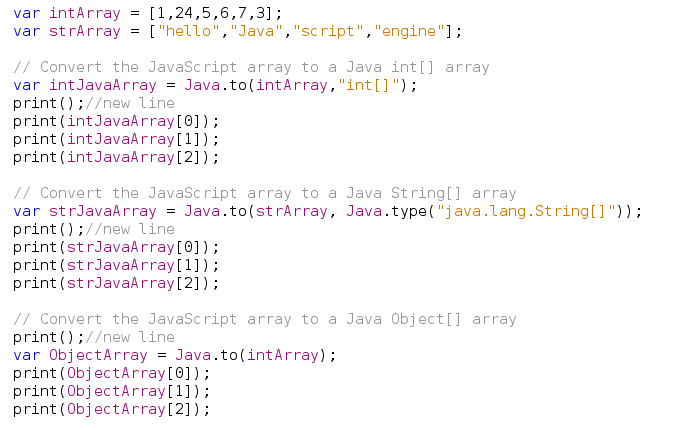
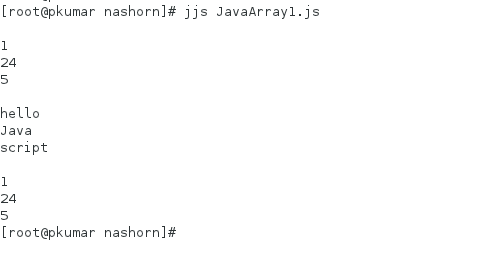
Given a JavaScript array, you can convert it to a Java array using the Java.to() method. You must pass the JavaScript array variable to this method and the type of array to be returned, either as a string or a type object. You can also omit the array type argument to return an Object[] array.
Also, you can convert it to a JavaScript array using the Java.from() method. Let's see an example
JavaArray1.js
Execution
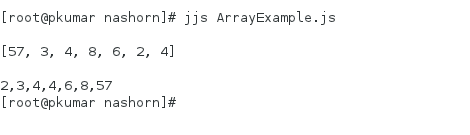
Example : Java 8 array Stream
ArrayExample.js

Implementing Java Interfaces
The syntax for implementing a Java interface in JavaScript is similar to how anonymous classes are declared in Java. You instantiate an interface and implement its methods (as JavaScript functions) in the same expression.
implementinterface.js

Execution

If a method expects an object that implements an interface with only one method, you can pass a script function to this method instead of the object. For instance, in the previous example, the Thread() constructor expects an object that implements the Runnable interface, which defines only one method. You can take advantage of automatic conversion and pass a script function to the Thread() constructor instead of the object.
implementinterfacescript.js

Execution

Extending Abstract Java Classes
You can instantiate an anonymous subclass of an abstract Java class by passing to its constructor a JavaScript object with properties whose values are functions that implement the abstract methods. If a method is overloaded, then the JavaScript function will provide implementations for all variants of the method.
The following example shows you how to instantiate a subclass of the abstract TimerTask class:
To avoid ambiguity, the syntax for extending abstract classes is not allowed for concrete classes. Because a concrete class can be instantiated.
To extend a concrete Java class, pass its type object to the Java.extend() function that returns a type object of the subclass. Then, use the type object of the subclass as a JavaScript-to-Java adapter to create instances of the subclass with the specified method implementations. The following example shows you how to extend the Thread class with the specified implementation of the run() method:
Instances created from the same extender type share the same class although their implementations differ on a per-instance basis. see below example
While this is fine in many cases, passing the implementation to each instance might not always be convenient. Indeed, there are cases where objects must be instantiated through some form of inversion-of-control mechanism, such as those found in dependency injection APIs. In such cases, the third-party APIs typically require a reference to the implementation class, which makes the previous extender mechanism unsuitable.
Fortunately, Java.extend allows implementations to be bound to a class definition rather than being specified for each instance. To do so, you simply need to pass an implementation JavaScript object as the last parameter.
Accessing Methods of a Superclass
To access methods in the superclass, you can use the Java.super() function.


Accessing Class and Instance Members
You can use the standard dot notation to access static fields, methods, and inner classes as follows:
Java.type("java.lang.Math").PI
To invoke an instance method or access an instance field of an object, use the dot operator, similar to how it is done in Java. The following example shows how to access static as well as instance members
ClassInstanceMembers.js
 Execution

Working with Java Collections
Nashorn interprets Java collections as arrays. You can access collection elements using the index in brackets ([]) and iterate over the values of a collection using the for each statement, as shown in the following example:
To access methods in the superclass, you can use the Java.super() function.
Accessing Class and Instance Members
You can use the standard dot notation to access static fields, methods, and inner classes as follows:
Java.type("java.lang.Math").PI
To invoke an instance method or access an instance field of an object, use the dot operator, similar to how it is done in Java. The following example shows how to access static as well as instance members
ClassInstanceMembers.js
Working with Java Collections
Nashorn interprets Java collections as arrays. You can access collection elements using the index in brackets ([]) and iterate over the values of a collection using the for each statement, as shown in the following example:
ArrayListHashMap.js

Oracle Nashorn is an excellent way to take advantage of a scripting language for polyglot applications on the JVM. JavaScript is a popular language, and the interaction between Java and JavaScript is both seamless and straightforward for a wide range of use cases.
If you know anyone who has started learning Java, why not help them out! Just share this post with them.
Thanks for studying today!...
Thanks for studying today!...