Sunday, January 12, 2014

Final keyword examples in Java

In this post, we see the different use of final keyword when it's applied to class, methods and variables.


Final Classes


Final methods


Final variables


Final Objects


Final Arguments


Final classes
A final class is a non-inheritable class—that is to say, if you declare a class as final, you cannot subclass it.In other words, no other class can ever extend (inherit from) a final class, and any attempts to do so will give you a compiler error.

So why would you ever mark a class final? After all, doesn't that violate the whole object-oriented (OO) notion of inheritance?

In some cases you don’t want to allow a class to be sub classed. Two important reasons are
  • To prevent a behavior change by sub-classing. In some cases, you may think that the implementation of the class is complete and should not change. If overriding is allowed, then the behavior of methods might be changed. You know that a derived object can be used where a base class object is required, and you may not prefer it in some cases. By making a class final, the users of the class are assured the unchanged behavior
  • Improved performance. All method calls of a final class can be resolved at compile time itself. As there is no possibility of overriding the methods, it is not necessary to resolve the actual call at runtime for final classes, which translates to improved performance. For the same reason, final classes encourage the inlining of methods. If the calls are to be resolved at runtime, they cannot be inlined.

You'll notice many classes in the Java core libraries are final. For example, the String class cannot be subclassed. Imagine the havoc if you couldn't guarantee how a String object would work on any given system your application is running on! 
So use final for safety, but only when you're certain that your final class has indeed said all that ever needs to be said in its methods. Marking a class final means, in essence, your class can't ever be improved upon, or even specialized, by another programmer.

Another example, java.lang.System. These classes are used extensively in almost all Java programs. For example, if you use a System.out.println() statement, you are using both the System class as well as the String class since println takes String as an argument.If these two classes are not declared final, it is possible for someone to change the behavior of these classes by subclassing and then the whole program can start behaving differently

A benefit of having nonfinal classes is this scenario
Imagine you find a problem  with a method in a class you're using, but you don't have the source code. So you can't modify the source to improve the method, but you can extend the class and override the method in your new subclass, and substitute the subclass everywhere the original superclass is expected. If the class is final, though, then you're stuck.


Final Methods
In a class, you may declare a method final. The final method cannot be overridden. Therefore, if you have declared a method as final in a non-final class, then you can extend the class but you cannot override the final method. But, other non-final methods in the base class can be overridden in the derived class implementation.
It often used to enforce the API functionality of a method.
For example, the Thread class has a method called isAlive() that checks whether a thread is still active. If you extend the Thread class, though, there is really no way that you can correctly implement this method yourself (it uses native code, for one thing), so the designers have made it final.
Just as you can't subclass the String class you can't override many of the methods in the core class libraries.
class test{  
      final void print(){  
           System.out.println("hello test");  
      }  
 }  
 public class FinalMethodOverride extends test{  
      void print(){ // error  
           System.out.println("Hello overloaded test");  
      }  
 }  

Final variables
Using the "final" keyword makes the the variable you are declaring immutable. Once initially assigned it cannot be re-assigned.

Final variables are like CD-ROMs: once you write something on them, you cannot write again. In programming, universal constants such as PI can be declared as final since you don’t want anyone to modify the value of such constants. Final variables can be assigned only once. If you try to change a final variable after initialization, you will get a complaint from your Java compiler.
public class FinalVariable{  
      public static void main(String javalatt[]){  
           final int i = 10;  
           i = 10; // error  
      }  
 } 


Reasons why you would use the "final" keyword on variables
  • Optimization where by declaring a variable as final allows the value to be memoized
  • You would use a final variable is when an inner class within a method needs to access a variable in the declaring method.
Example
public class FinalVarialbeOne {  
      public static void main(String java[]){  
           new Hello().go();  
      }  
      public void go(){  
           final int counter = 5;  
           new Runnable() {  
                @Override  
                public void run() {  
                     int i = counter;  
                     System.out.println("i="+i);  
                }  
           }.run();  
      }  
 }  
Sample Output

i=5


Final Object
The value of a final parameter cannot be changed once assigned. Here, it is important to note that the “value” is implicitly understood for primitive types. However, the “value” for an object refers to the object reference, not its state.
class Test2{  
      private int i = 10;  
      void setValue(int i){  
           this.i=i;  
      }  
      int getValue(){  
           return this.i;  
      }  
 }  
 public class FinalMethodOverride extends test{  
      public static void main(String javalatte[]){  
           final Test2 ts1 = new Test2();  
           ts1.setValue(100);  
           ts1 = new Test2(); //error   
      }  
 }  
If an object is final you can call any methods that do internal changes as usual, but you cannot reassign the reference to point to a different object


Final Arguments
Method arguments are the variable declarations that appear in between the parentheses in a method declaration.

public void sum(int a, final int b)

In this example, the variable b is declared as final, which of course means it can't be modified within the method. In this case, "modified" means reassigning a new value to the variable. In other words, a final argument must keep the same value that the parameter had when it was passed into the method.


Points to Remember

  • Final stop value change.
  • Final stop method overriding.
  • Final stop inheritance.
  • The final modifier can be applied to a class, method, or variable. All methods of a final class are implicitly final (hence non-overridable).
  • A final variable can be assigned only once. If a variable declaration defines a variable as final but did not initialize it, then it is referred to as blank final. You need to initialize a blank final all the constructors you have defined in the class; otherwise the compiler will complain.
  • The keyword final can even be applied to parameters. The value of a final parameter cannot be changed once assigned. Here, it is important to note that the “value” is implicitly understood for primitive types. However, the “value” for an object refers to the object reference, not its state. Therefore, you can change the internal state of the passed final object, but you cannot change the reference itself.


If you know anyone who has started learning java, why not help them out! Just share this post with them. 
Thanks for studying today!...

Friday, January 10, 2014

Java naming conventions

In this post, we look into the basic naming conventions that everybody should know. The basic thing is how to write class names, variables, interfaces and methods name as per oracle standard naming conventions.


In professional environments, the benefits of coding standards are readability, maintainability and compatibility. Any member of a development should be able to read the code of another member. The coder who maintains a piece of code tomorrow may not be the coder who programmed it today. In addition, today’s enterprise solutions are so complex that multiple development teams unite to build a singular enterprise software application. With coding standards, distinct teams can rely o­n the way that they can interface with the code built by a separate team.

Classes and Interfaces
The first letter should be capitalized and if several words are linked together to form the name, the first letter of the inner words should be uppercase.
This sometimes called "camelCase".

  • Try to keep your class names simple and descriptive.
  • Use whole words-avoid acronyms and abbreviations 
Example of class:
Dog
Account
Factorial
PrintWriter

Example of interface:
Runnable
Serializable
FlyingInterface


Methods
The first letter should be lowercase, and then normal camelCase rules should be used.

Example:
run()
runFast()
getBalance()
doCalculation()
setCustomerName()


Variables

  • Like methods, the camelCase format should be used, starting with a lowercase letter.
  • Variable names should not start with underscore _ or dollar sign $ characters, even though both are allowed.
  • Variable names should be short yet meaningful.
  • The choice of a variable name should be designed to indicate to the casual observer the intent of its use.
  • One-character variable names should be avoided except for temporary "throwaway" variables.

Example:
int i;
float buttonWidth;
long accountBalance;


Constants
Java constants are created by marking variables static and final. They should be named using uppercase letters with underscore characters as separators.

Example:
static final int MIN_WIDTH = 4;
static final int MAX_WIDTH = 999;
static final int MIN_HEIGHT = 40;
static final int MAX_COUNT = 1000;


If you know anyone who has started learning java, why not help them out! Just share this post with them. 
Thanks for studying today!...

Friday, January 3, 2014

Global Variable vs Class Variable vs Instance Variable vs Local Variable in Java

In this post, we'll develop some basic understanding of different kind of variable in java and how they are differ from each other with the help of some examples.


Local variable
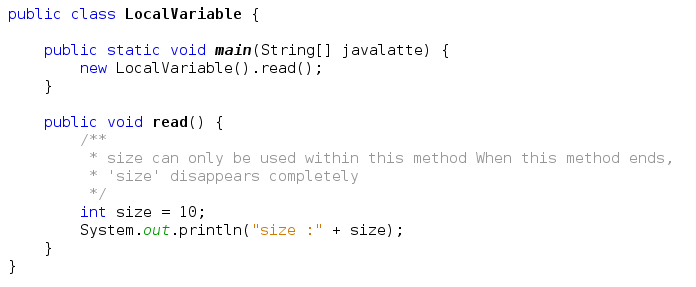
A local variable lives only within the method that declared the variable.

Variable's can be used only within the read() method. In other words, the variable is in scope only within its own method. No other code in the class can see.
When you call a same method second time, it recreates the local variables, and reinitialized them.

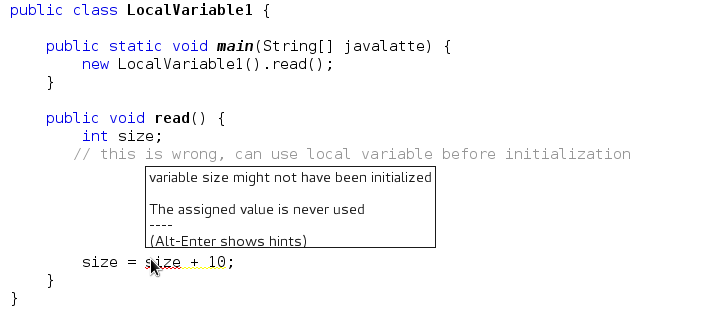
Before using local variable, it must be initialized.

Local variables, including primitives, always, always, always must be initialized before you attempt to use them.
  • Just don't forget that while the local variable is on the stack, if the variable is an object reference, the object itself will still be created on the heap. There is no such thing as a stack object, only a stack variable.
  • Local variable declarations can't use most of the modifiers that can be applied to instance variables, such as public (or the other access modifiers), transient, volatile, abstract, or static, but local variables can be marked final.


Class Variables
A class variable is a variable defined in a class (i.e. a member variable) of which a single copy exists, regardless of how many instances of the class exist.
Sometimes, you want to have variables that are common to all objects. This is accomplished with the static modifier. Fields that have the static modifier in their declaration are called static fields or class variables. They are associated with the class, rather than with any object. 
  • Every instance of the class shares a class variable, which is in one fixed location in memory.
  • Any object can change the value of a class variable.
  • Class variables can also be manipulated without creating an instance of the class.

Sample Output
c1 size : 10 c2 size : 10 c3 size :10
c1 size : 50 c2 size : 50 c3 size :50
Size = 50


The problem is that main() is itself a static method, and thus isn't running against any particular instance of the class, rather just on the class itself.
A static method can't access a nonstatic (instance) variable, because there is no instance!

That's not to say there aren't instances of the class alive on the heap, but rather that even if there are, the static method doesn't know anything about them. The same applies to instance methods; a static method can't directly invoke a nonstatic  method. Think static = class, nonstatic = instance


Instance Variable
  • There are those variable that is associated with object.
  • Instance variables are defined inside the class, but outside of any method, and are only initialized when the class is instantiated.
  • Their values are unique to each instance of a class.
  • An instance variable lives as long as the object does. If object is still alive, so are its instance variables.
You need to know that instance variables
  • Can use any of the four access levels (which means they can be marked with any of the three access modifiers)
  • Can be marked final
  • Can be marked transient
  • Cannot be marked abstract
  • Cannot be marked synchronized
  • Cannot be marked strictfp
  • Cannot be marked native
  • Cannot be marked static, because then they'd become class variables.

Sample Output
c1 size :2 c2 size:0 c3 size:0

c1 price :0 c2 price:100 c3 price:0


Global Variable
There is no direct concept of global variable in java, but you implement the same in different number of ways.

With the help of static keyword and public access modifier.
public class GlobalVariable {  
      public static int MAX_SIZE = 1000;  
      public static int MIN_SIZE = 1;  
 }
Now you can access MAX_SIZE and MIN_SIZE from anywhere by calling like this
globalVariable.MAX_SIZE 
globalVariable.MIN_SIZE 

With the help of interface
public interface GlobalVariable1 {  
      /**  
       * Variable are implicitly public, static, and final  
       */  
       int MAX_SIZE = 1000;  
       int MIN_SIZE = 1;  
 } 
Any class that needs to use these, can implement the interface.
public class GlobalVariable1Demo implements GlobalVariable1{  
      public static void main(String[] args) {  
           System.out.println("Max Size :"+MAX_SIZE);  
           System.out.println("Max Size :"+MIN_SIZE);  
      }  
 } 

The static modifier, in combination with the final modifier, is also used to define constants. The final modifier indicates that the value of this field cannot change.


Related Post
Stack and Heap Memory Concept in java
this keyword in java
Why to override hashCode() and equals() in java

If you know anyone who has started learning java, why not help them out! Just share this post with them. 
Thanks for studying today!...

Monday, December 23, 2013

Enumeration vs Iterator in Java

In this post, we'll see what is enumeration and Iterator and differences between them with the help of some examples.


Enumeration
Enumeration is a public interface in Java, introduced in JDK 1.0, which provides the ability to enumerate through sequences of elements. It is found under java.util package.

An object that implements the Enumeration interface generates a series of elements, one at a time. Successive calls to the nextElement method return successive elements of the series.

Method of Enumeration Class
Method  Description Exception
boolean  hasMoreElements() Tests if this enumeration contains more elements.element to provide; false otherwis
E   nextElement() Returns the next element of this enumeration if this enumeration object has at least one more element to provide. NoSuchElementException - if no more elements exist.

Example
 import java.util.Enumeration;  
 import java.util.Hashtable;  
 import java.util.Vector;  
 public class EnumerationDemo {  
      public static void main(String[] javalatte) {  
           Vector<String> l = new Vector<String>();   
           l.add("java");  
           l.add("-");  
           l.add("latte");  
           l.add(".");  
           l.add("blogspot");  
           l.add(".com");            
           Enumeration<String> en = l.elements();  
           while(en.hasMoreElements()){  
                System.out.println(en.nextElement());  
           }  
           System.out.println();  
           Hashtable<String, String> ht = new Hashtable<String,String>();  
           ht.put("java", "1");  
           ht.put("latte", "2");  
           ht.put("blogspot", "3");  
           ht.put("com", "4");  
           Enumeration<String> enHash = ht.elements();  
           while(enHash.hasMoreElements()){  
                System.out.println(enHash.nextElement());  
                ht.remove("com"); // you can remove while iterating and no ConcurrentModificationException  
           }  
           System.out.println(enHash.nextElement()); // thows NoSuchElementException as not element exist.   
      }  
 }  
Sample Output
java
-
latte
.
blogspot
.com

3
2
1
Exception in thread "main" java.util.NoSuchElementException: Hashtable Enumerator
at java.util.Hashtable$Enumerator.nextElement(Unknown Source)

at EnumerationDemo.main(EnumerationDemo.java:28)


Iterator
Iterator is a public interface in Java.util package, which allows iterating through elements of the collections objects that implement the Collections framework (such as ArrayList, LinkedList, etc.). This was introduced in JDK 1.2 and replaced the Enumerator within the Java Collections Framework.
The java.util.Iterator interface allows the iteration of container classes. Each Iterator provides a next() and hasNext() method, and may optionally support a remove() method. Iterators are created by the corresponding container class, typically by a method named iterator().
Additionally, for java.util.List there is a java.util.ListIterator with a similar API but that allows forward and backward iteration, provides its current index in the list and allows setting of the list element at its position.
The J2SE 5.0 release of Java introduced the Iterable interface to support an enhanced for (foreach) loop for iterating over collections and arrays.

Method of Iterator Class
Method  Description Exception
boolean  hasNext() Returns true if the iteration has more elements.
E  next() Returns the next element in the iteration NoSuchElementException - if no more elements exist.
void  remove() Removes from the underlying collection the last element returned by this iterator (optional operation). UnsupportedOperationException -  if the remove operation is not supported by this iterator                                                   IllegalStateException - if the next method has not yet been called, or the remove method has already been called after the last call to the next method


Example
 import java.util.ArrayList;  
 import java.util.Iterator;  
 public class IteratorDemo {  
      public static void main(String[] javalatte) {  
           ArrayList<String> ar = new ArrayList<String>();  
           ar.add("java");  
           ar.add("-");  
           ar.add("latte");  
           ar.add("blogspot");  
           ar.add(".");  
           ar.add("com");  
           Iterator<String> it = ar.iterator();  
           while(it.hasNext()){  
                System.out.println(it.next());  
           }  
           //System.out.println(it.next()); //it throws NoSuchElementException as not element exist.   
           System.out.println();  
           Iterator<String> it1 = ar.iterator();  
           while(it1.hasNext()){  
                System.out.println(it1.next());  
                ar.remove(3); // it will throw ConcurrentModificationException  
           }            
      }  
 }  
Sample Output
java
-
latte
blogspot
.
com

java
Exception in thread "main" java.util.ConcurrentModificationException
at java.util.ArrayList$Itr.checkForComodification(Unknown Source)
at java.util.ArrayList$Itr.next(Unknown Source)

at IteratorDemo.main(IteratorDemo.java:22)


Difference between Enumeration and Iterator
Both are interface,not an implementation, and even new libraries sometimes still use the old Enumeration.
From the above discussion, following differences are clear.


  • Method names have been improved.
    Enumeration  methods   Iterator
    hasMoreElement() hasNext()
    nextElement() next()
    remove()
  • Iterators allow the caller to remove elements from the underlying collection during the iteration with well-defined semantics. we'll see example of this next.
  • Iterators are fail-fast,when one thread changes the collection with add or remove operations or you modify the collection, while another thread is traversing it through an Iterator using hasNext() or next() method, the iterator fails quickly by throwing ConcurrentModificationException.
  • Enumeration is applicable for Legacy Classes.


Iterator remove() method example
import java.util.ArrayList;  
 import java.util.Iterator;  
 public class IteratorRemoveDemo {  
      public static void main(String[] args) {  
           ArrayList<String> ar = new ArrayList<String>();  
           ar.add("java");  
           ar.add("-");  
           ar.add("latte");  
           ar.add("blogspot");  
           ar.add(".");  
           ar.add("com");  
           Iterator<String> it = ar.iterator();  
           System.out.println("Array Size= "+ar.size());  
           while(it.hasNext()){  
                System.out.println(it.next());  
                it.remove();                 
           }  
           System.out.println("Array Size= "+ar.size());  
      }  
 }  
Sample Output
Array Size= 6
java
-
latte
blogspot
.
com

Array Size= 0

Note: One point to remember while using remove() method, if you call remove() before hasNext() java.lang.IllegalStateException will occur.
      Iterator<String> it = ar.iterator();  
           it.remove();  // new line in the above code
           System.out.println("Array Size= "+ar.size());  
           while(it.hasNext()){  

In addition, you can produce an Enumeration for any Collection by using the Collections.enumeration() method, as seen in the following example:
 import java.util.ArrayList;  
 import java.util.Collections;  
 import java.util.Enumeration;  
 public class newLatte {  
      public static void main(String[] args) {  
           ArrayList<String> ar = new ArrayList<String>();  
           ar.add("java");  
           ar.add("-");  
           ar.add("latte");  
           ar.add("blogspot");  
           ar.add(".");  
           ar.add("com");  
           Enumeration<String> en = Collections.enumeration(ar);  
           while(en.hasMoreElements()){  
                System.out.println(en.nextElement());  
           }  
      }  
 }
Sample output
java
-
latte
blogspot
.

com


Related Post
How to iterate over Map in 4 ways
Over of Java Collection Framework

If you know anyone who has started learning java, why not help them out! Just share this post with them. Thanks for studying today!...

Wednesday, December 18, 2013

Constructor, constructor chaining and overloading of constructor in Java

Everybody knows what a constructor is i.e, constructor create new object but the purpose of this post is cover detailed concepts about constructor which includes rules for creating and defining constructors, constructor chaining and what is the need of private constructor and when does compiler provide the default constructor for us. 

Objects are constructed. You can't make a new object without invoking a constructor.
In fact, you can't make a new object without invoking not just the constructor of the object's actual class type, but also the constructor of each of its superclasses.

Constructors are special methods that create and return an object of the class in which they’re defined. Constructors have the same name as the name of the class in which they’re defined, and they don’t specify a return type—not even void

3 Steps of object declaration, creation and assignment.
  • Step 1. Declare a reference variable
    • Latte mylatte = new Latte();
    • Make a new reference variable of a class or interface type
  • Step 2. Create an object
    • Latte mylatte = new Latte();
  • Step 3. Link the object and the refernce
    • Latte mylatte new Latte();
    • Assign the new object to the reference.

Q. Are we here calling a method name Latte()? Because it sure look like it.
No We're calling the Latte constructor.
A constructor does look and feel a lot like a method, but it is not a method. It's got the code the run when you say new.  The only way to invoke a constructor is with the new keyword.


Constructor Basics
Every class, including abstract classes, MUST have a constructor. Store this into your brain. It is not necessarily to type it just because class must have one.

A Constructor look like:
 class latte {  
  latte(){ }       
 }  

Have you noticed something is missing? There is no return type!

Two point to remember about constructors:
  • they have no return type 
  • their names must exactly match the class name

Typically, constructors are used to initialize instance variable state, for instance
 class latte {  
  int size;  
  String name;  
  latte(int size, String name){  
  this.size=size;  
  this.name=name;  
  }       
 }

Here you may be noticed that latte class doesn't have no-arg constructor. That means the following will fail to compile:

latte l = new latte(); // won't compile

but the following will compile

latte l = new latte(5,"caffee"); // no problem, argument match the latte constructor

What we get from this, is that it's very common and may be desirable for a class to have a no-arg constructor, regardless of how many other overloaded constructor is present in the class.
Oh, yes, constructor can be overloaded.


How Constructor Chaining works


Consider the basic animal hierarchy where we assume Horse extends Animal and Animal extends Object.

 class Animal{  
 }  
 Class Horse extends Animal{  
 }  


We know that constructors are invoked at runtime when you say new on some class type as follows:
Horse h = new Horse();

  1. Horse constructor is invoked. Every constructor invokes the constructor of its superclass with an (implicit) call to super(), unless the constructor invokes an overloaded constructor of the same class.
  2. Animal constructor is invoked because Animal is the superclass of Horse.
  3. Object constructor is invoked.At this point we're on the top of the stack.
  4. Object instance variables are given their explicit values. By explicit values, we mean values that are assigned at the time the variables are declared.
  5. like "int x = 5", where "5" is the explicit value (as opposed to the default value) of the instance variable.
  6. Object constructor completes.
  7. Animal instance variables are given their explicit values.
  8. Animal constructor completes.
  9. Horse instance variables are given their explicit values (if any)
  10. Horse constructor completes.

Summary


The MUST remember rules for constructor to answer any interview questions regarding constructor

  1. Constructors can use any access modifier, including private.
    A private constructor means only code within the class itself can instantiate an object of that type, so if the private constructor class wants to allow an instance of the class to be used, the class must provide a static method or variable that allows access to an instance created from within the class. Click here to see more
  2. The constructor name must match the name of the class.
  3. Constructors must not have a return type.
  4. It's legal (but stupid) to have a method with the same name as the class, but that doesn't make it a constructor. If you see a return type, it's a method rather than a constructor.
  5. If you don't type a constructor into your class code, a default constructor will be automatically generated by the compiler. we will see this in the next section
  6. The default constructor is ALWAYS a no-arg constructor.
  7. If you want a no-arg constructor and you've typed any other constructor(s) into your class code, the compiler won't provide the no-arg constructor for you.
  8. Every constructor has, as its first statement, either a call to an overloaded constructor (this()) or a call to the superclass constructor (super()), although remember that this call can be inserted by the compiler.
  9. If you do type in a constructor and you do not type in the call to super() or a call to this(), the compiler will insert a no-arg call to super() for you, as the very first statement in the constructor.
  10. A call to super() can be either a no-arg call or can include arguments passed to the super constructor.
  11. You cannot make a call to an instance method, or access an instance variable, until after the super constructor runs.
  12. Only static variables and methods can be accessed as part of the call to super() or this().
  13. Abstract classes have constructors, and those constructors are always called when a concrete subclass is instantiated.
  14. The only way a constructor can be invoked is from within another constructor. In other words, you can't write code that actually calls a constructor. You try by yourself to check this.

Whether a Default Constructor Will Be Created
The following example shows a Horse class with two constructors:
class latte{  
      latte(){ }  
      latte(String name){ }  
 }  
In this case compiler won't put default constructor.
class latte{  
      latte(String name){ }  
 } 
In this case also compiler won't put default constructor.
 class latte{ } 
In this case compiler will generate a  default constructor for the preceding class, because the class doesn't have any constructors defined

what about this class?
class latte{  
      void latte(){ }  
 } 
It might look like the compiler won't create one, since there already is a constructor in the latte class.What's wrong with the latte() constructor? It isn't a constructor at all! It's simply a method that happens to have the same name as the class.


Overloaded constructor

Overloading a constructor means typing in multiple versions of the constructor, each having a different argument list, like the following examples:
 class Latte{  
      Latte(){  
      }  
      Latte(String name){  
      }  
      Latte(int size){  
      }  
      Latte(String name, int size){  
      }  
      Latte(int size,String name){  
      }  
 }
If you have 2 constructor that took only an int, for example, the class wouldn't compile. What you name the parameter variable doesn't matter. It's the variable type and order that matters. A constructor that takes a string followed by an int, is not the same as one that takes an int followed by string.
Overloading a constructor is typically used to provide alternate ways for clients to instantiate objects of your class. For example, if a client knows the animal name, they can pass that to an Animal constructor that takes a string. But if they don't know the name, the client can call the no-arg constructor and that constructor can supply a default name.

Five different constructor means five different ways to make a new Latte object.


Example
 public class JavaLatte {  
      String name;  
      JavaLatte(){  
           this("Cafee Latte");  
      }  
      JavaLatte(String name){  
           this.name=name;  
      }  
      public static void main(String javalatte[]){  
           JavaLatte jv = new JavaLatte();  
           System.out.println(jv.name);  
           JavaLatte jv1 = new JavaLatte("Cappicino");  
           System.out.println(jv1.name);  
      }       
 }

The key point to get from this code example. Rather than calling super(), we're calling this(), and this() always means a call to another constructor in the same class. OK, fine, but what happens after the call to this()? Sooner or later the super() constructor gets called, right? Yes indeed. A call to this() just means you're delaying the inevitable. Some constructor, somewhere, must make the call to super().


The benefit of having one constructor invoke another overloaded constructor is to avoid code duplication.
The call to super() must be the first statement in each constructor.For instance, following code won't compile.
 class Latte{  
      Latte(){  
      }  
 }  
 class JavaLatte extends Latte{  
      int size;  
      JavaLatte(){  
           size=5;  
           super();  
      }  
 }  

Superclass constructor with arguments
If superclass constructor has arguments? Can you pass something in to the super() call?
Of course. If you couldn't, you had never be able to extend a class that didn't have a no-arg constructor.
Imagine a scenario :
All animal have a name. There is getName() method in class Animal that returns the value of the name instance variable. The instance variable is marked private, but the subclass inherits getName() method. So here is the problem Horse has a getName() method, but does not have the name instance variable.
Horse has to depend on the Animal part of himself to keep the name instance variable and return it when someone call getName() on a Horse object
Question is how Animal part get the name???
The only reference Horse has to the animal part of himself is through super(), so this is the place where Horse send the name to the Animal object.
abstract class Animal{  
      private String name;  
      public String getName(){  
           return name;  
      }  
      public Animal(String name){  
           this.name=name;  
      }  
 }  
 class Horse extends Animal{  
      Horse(String name){  
           super(name);  
      }  
 }  
 public class HorseDemo{  
      public static void main(String[] javalatte){  
           Horse h = new Horse("HORSE ONE");  
           System.out.println(h.getName());  
      }  
 }  

Overridden constructor?
One last point on the whole default constructor thing, constructors are never inherited. They aren't methods. They can't be overridden (because they aren't methods and only instance methods can be overridden). So the type of constructor(s) your superclass has in no way determines the type of default constructor you'll get. Some folks mistakenly believe that the default constructor somehow matches the super constructor, either by the arguments the default constructor will have (remember, the default constructor is always a no-arg), or by the arguments used in the compiler-supplied call to super(). So, although constructors can't be overridden, you've already seen that they can be overloaded, and typically are.


Q1Doesn't the compiler always make a no-arg constructor for you?
Ans:
No. The compiler gets involved with the constructor making only if you don't say anything at all about constructor. If you write a constructor that takes arguments, and you still want a no-arg constructor, you'll have to build the no-arg constructor yourself.

Q2Do constructor need to be public?
Ans: No. Constructor can be public, private or default
Puzzle Question:
class latte{   
      String name;   
      latte(){   
           return;   
      }   
      latte(String name){   
           this.name=name;   
           return;   
      }   
 }   
 public class javalatte{   
      public static void main(String javalatte[]){   
           latte l = new latte("java.latte");   
           System.out.println(l.name);   
      }   
 }   
Guess the output?


If you know anyone who has started learning java, why not help them out! Just share this post with them. Thanks for studying today!...